Auto-Redact Sensitive Data in Screenshots Instantly.
Passwords, credit cards, API keys, and customer IDs... Automatically detect and mask sensitive data on-device using AI before you share.
See the Difference: Exposed vs. Protected
Human errors in screenshots cost millions in leaked credentials. SecureSnap guarantees peace of mind.
Standard Screenshot (Exposed & Dangerous)
High Risk Leak- ❌ API keys, passwords, and credit card numbers fully visible.
- ❌ Accidentally shared into public Slack, Discord, or AI chats.
Captured with SecureSnap (Auto-Masked & Safe)
100% Protected- ✅ Credit cards (Luhn-checked), API keys, and PII instantly redacted.
- ✅ Safe to share with ChatGPT, Claude, Gemini, or team channels.
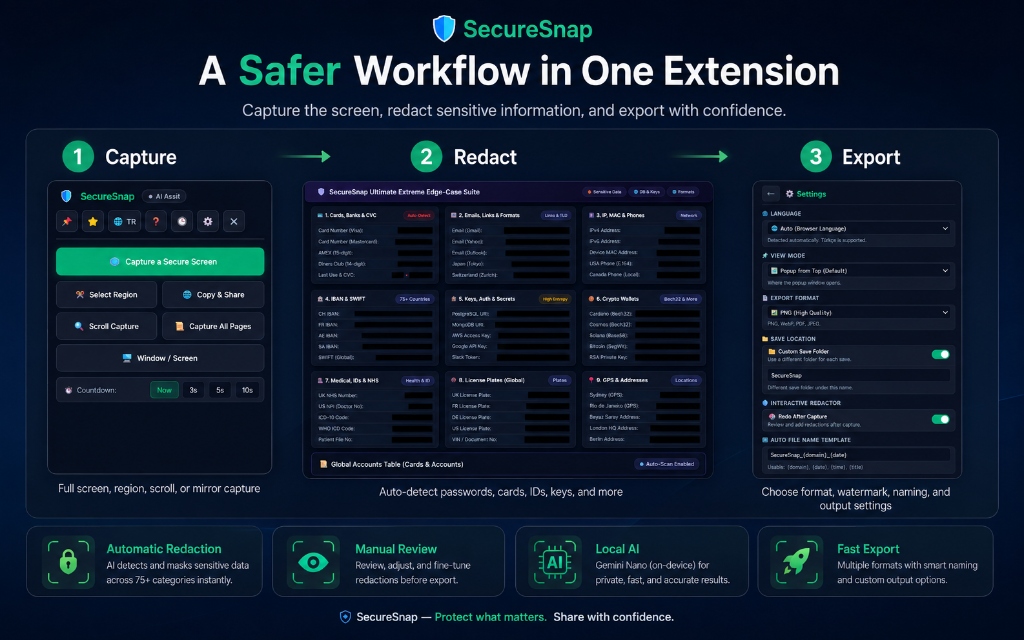
Capture, Redact, and Export in Seconds
A complete unified capture pipeline that respects your time. Select a region, full scroll page, or specific element, apply automatic AI redaction, and export in your preferred format.
- Multi-mode capture: Visible screen, regional crop, and full-page scrolling
- Instant redaction filters for over 75+ data categories
- One-click export to PNG, WebP, JPEG, or High-Res PDF
Protect Even the Most Complex Sensitive Data
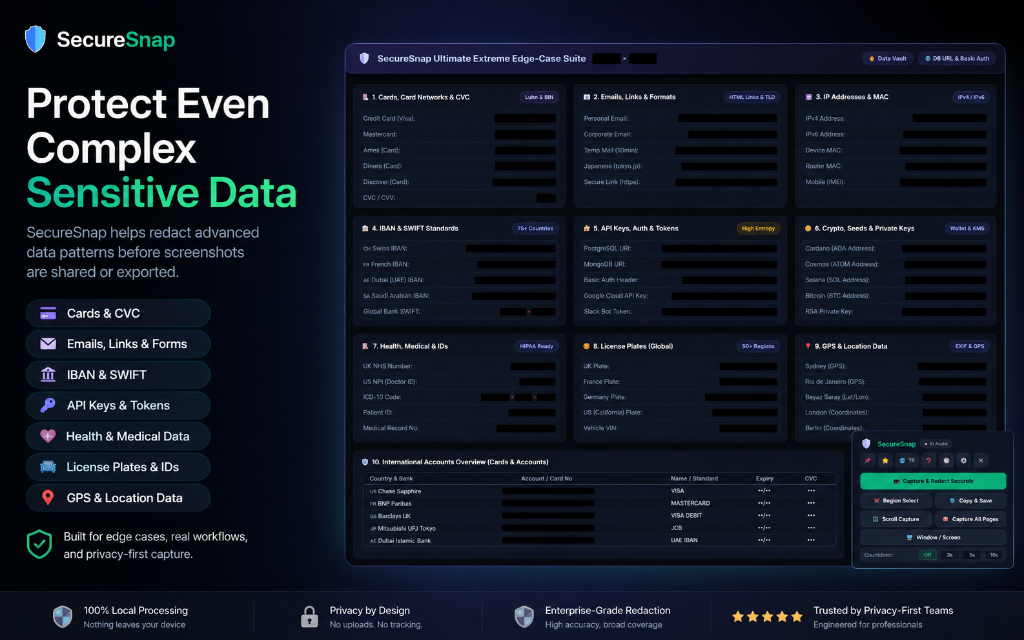
Engineered specifically for developers, support agents, QA engineers, and finance pros dealing with high-risk edge cases.
- Credit Cards (Visa, MasterCard, Amex) verified via Luhn algorithm
- Global Bank IBANs & SWIFT codes across 75+ countries
- API keys, JWT tokens, AWS/Stripe/OpenAI secrets, and crypto seeds
- Healthcare IDs, ICD-10 medical codes, GPS locations, and license plates
Powerful Settings, Built to Fit Your Workflow
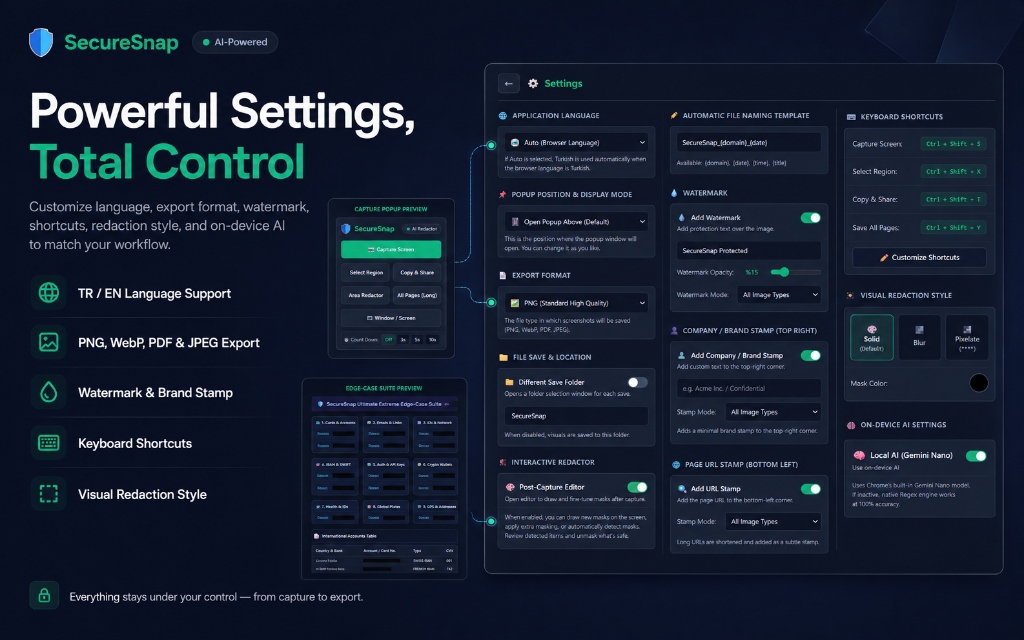
Tailor every aspect from custom keyword auto-masking to watermark stamping, keyboard shortcuts, and export destinations.
- Visual redaction styles: Solid dark box, Gaussian Blur, or Pixelated (****)
- Custom Brand Watermark: Add your company stamp or remove logos (Pro)
- Custom keyword dictionary: Automatically censor client names or private terms
Everything You Need for Secure Screenshots
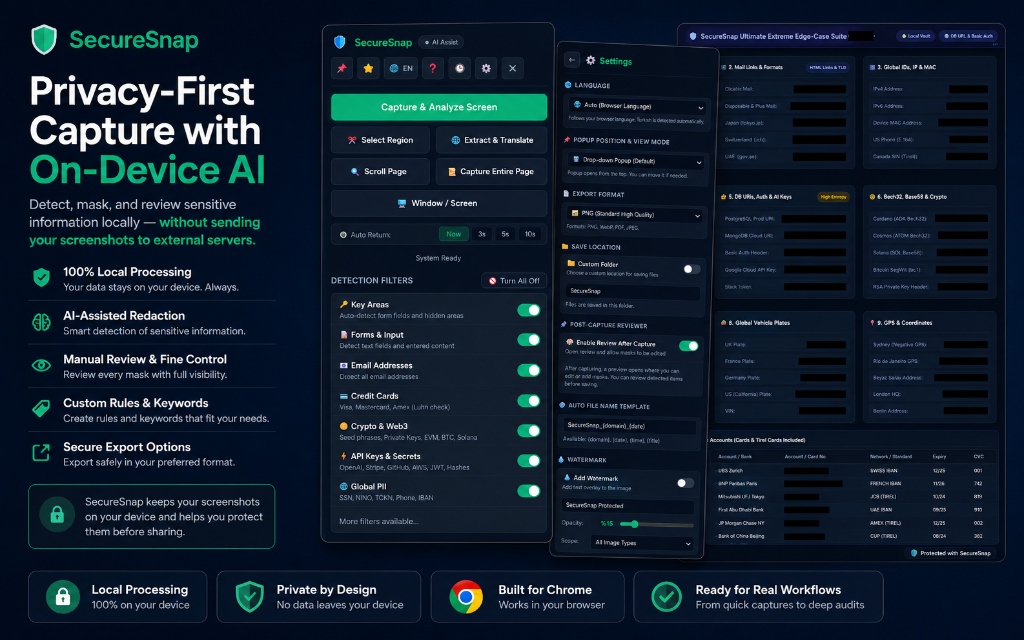
A powerhouse browser extension designed from the ground up for strict confidentiality.
Smart Automatic Masking
Combines ultra-fast client regex patterns with Chrome's on-device Gemini Nano AI for flawless detection accuracy.
Scrolling Full-Page Capture
Capture entire infinite-scroll pages, internal scrollable tables, or nested dashboard containers seamlessly.
Built-In Studio Editor
Highlight with arrows, spotlight focus boxes, step badges (① ② ③), and hold the Alt key to preview under the mask.
Direct AI Chat Sharing
Directly paste or pipe sanitized screenshots into ChatGPT, Claude, or Gemini chats without fear of leaking secrets.
White-Label Brand Stamp (Pro)
Remove the SecureSnap footer badge or brand your screenshots with your own custom agency or team watermark.
High-Resolution PDF & WebP
Export crisp vector-like multi-page PDF documents or lightweight WebP files ready for reports and audit logs.
How SecureSnap Works
No complex setup. No cloud accounts required. Just install and capture.
1. Trigger Capture
Use your customizable keyboard shortcut or click the extension icon to select visible, regional, or full-page mode.
2. Automatic AI Redaction
SecureSnap analyzes the captured pixels locally, automatically applying redaction to all detected sensitive elements.
3. Share with Confidence
Review, fine-tune annotations, copy directly to your clipboard, or save to your downloads folder.
Choose Your SecureSnap Plan
Get started for free or upgrade to Pro for lifetime white-label branding and advanced export formats.
Free / 60-Day Trial
Full feature access with minimal SecureSnap brand stamp.
- ✓ All 75+ AI & regex masking filters
- ✓ Full page & scrolling capture
- ✓ Studio editor & annotation tools
- ✓ PNG & JPEG export formats
- ✓ Minimal SecureSnap footer stamp
Lifetime Pro
One-time payment for lifetime peace of mind.
- ✓ All Free Features included
- ✓ White-Label (Remove SecureSnap watermark)
- ✓ Custom Company/Agency Logo Stamp
- ✓ High-Resolution PDF & WebP export
- ✓ Lifetime updates & priority support
Monthly VIP
Flexible monthly subscription for active professionals.
- ✓ All Pro features unlocked
- ✓ Remove all watermarks
- ✓ Custom brand stamps
- ✓ Multi-page PDF export
- ✓ Cancel anytime with one click
Got Questions? We Have Answers.
Everything you need to know about SecureSnap's security architecture and licensing.
Absolutely not. SecureSnap operates under a strict 100% on-device architecture. All OCR, regex matching, and image processing happen entirely inside your local browser memory sandbox. We have zero remote servers receiving your images.
SecureSnap interfaces with Chrome's built-in local AI model (Gemini Nano) directly through the browser API. This allows contextual understanding of complex data without transmitting any network bytes outside your machine.
Yes! Your SecureSnap Pro license key is tied to your email and Chrome profile, allowing you to use it on your work laptop, home PC, and secondary workstations seamlessly.
You can add any proprietary company terms, project names, or custom patterns to your 'Custom Keywords' list in the Settings panel. SecureSnap will automatically detect and mask those words across all future screenshots.
Ready to Capture Screenshots Without Fear?
Join thousands of developers, IT teams, and privacy-conscious professionals protecting their sensitive data today.
Add SecureSnap to Chrome (Free)